



Live Event Experiences That Drive Engagement
Which types of live event experiences drive engagement?
A live event experience is any moment where attendees do something together in real time: listen, ask, try, compete, meet or celebrate. Engagement comes from those moments, not from the number of sessions on the agenda. An agenda made only of talks keeps people in their seats. An agenda that mixes a few types of experience gives attendees reasons to speak, move and meet.
This guide describes nine types of live experience, what each is for and when it fails, then shows how to choose by goal, how to blend in-person and virtual versions, and gives a selection table and a planning template. It sticks to practical design choices rather than claims about what works best, since the right mix depends on your audience and goal.
Updated by the Eventdex team



4.7/5 from 39 reviews on each
Nine types of live event experience
Each of these has a different job. Pick types for the job, not for novelty.
Keynotes and talks
One voice to a large room. Best for setting direction, sharing news and giving the event a shared moment. Weak at interaction unless you add live questions or polls.
Keynote speaker guideWorkshops and hands-on sessions
Small groups learn by doing. Best for skills and for attendees who want to leave with something made. They need limited places, a clear facilitator and materials ready.
Breakout sessionsProduct demos and launches
Attendees see and try a product. Best for sales, partners and customers. Works better when guests can ask questions live than when they only watch.
Product launch eventPanels and fireside chats
A moderated conversation among several voices. Best for debate and different viewpoints. Needs a strong moderator and audience questions collected in advance and live.
Panel discussion formatNetworking formats
Structured meetings, roundtables, speed networking and matched introductions. Best when people attend mainly to meet each other.
Networking event ideasImmersive and experiential activations
Spaces and activities built around a brand, product or theme, where attendees take part rather than watch. Best for memorability and for audiences who join to explore.
Experiential eventsEntertainment and games
Music, trivia, competitions and shared play. Best for energy, breaks between heavy content and community feeling. Keep them short and relevant to the audience.
Awards and recognition
A ceremony that honors people and gives the event a high point. Best for associations, companies and fundraisers.
Awards ceremony guideProduct and community moments
A short, planned moment such as a reveal, a vote or a shared announcement that everyone takes part in at once, in the room and online.
How to choose by goal
Start with what you want attendees to do or feel, then choose the experiences most likely to produce it. Most events need two or three types, not nine.
| Goal | Experiences to consider | What to watch |
|---|---|---|
| Share news or direction | Keynote, product moment | Add live questions so it is not one way |
| Teach a skill | Workshop, demo | Cap the group size and prepare materials |
| Build relationships | Speed networking, roundtables, matched meetings | Give people a reason and a prompt to talk |
| Generate leads for sponsors or sales | Demos, booth activities, challenges | Make the visit worth the attendee's time |
| Create energy and shared memory | Entertainment, games, immersive activations | Keep it brief and on theme |
| Recognize people | Awards, community moments | Keep the ceremony short and the speeches shorter |
| Debate an idea | Panel, fireside chat | Choose a moderator who will interrupt |
How to blend in-person and virtual experiences
Do not copy a room experience onto a screen. Design the remote version on its own terms, and give both audiences a way to take part in the same moment.
Talks and panels travel well: stream them, and take questions from both audiences through one moderator. Workshops can run in parallel, one in the room and one online, with a short shared debrief. Networking needs a separate design for each audience, such as matched video meetings online and a speed networking round in the room. Games work across both if the scoring is shared, so a leaderboard shows everyone.
Match the tool to the experience
Decide the experience first and the technology second. A poll tool does not make a session interactive if the host never reads the results out.
Share one moment
Choose one or two moments, such as an announcement or a poll, where both audiences act at the same time.
Give remote guests a host
A person whose only job is to bring the online audience into the room keeps them from becoming spectators.
Separate the networking
Do not expect remote and onsite guests to meet by chance. Offer online introductions or scheduled meetings.
Keep sessions shorter online
Attention on a screen differs from attention in a room, so shorten sessions and add interaction.
Hybrid event ideas
Where live experiences go wrong
Most failed experiences fail for ordinary reasons. Check your plan against these before you commit to an agenda.
A good test is to read your agenda as an attendee and mark every point where you would be asked to do something other than sit and listen. If there is none in the first hour, people will check their phones. If every session asks for participation, people will tire. Aim for a rhythm: a talk, then a chance to respond, then a break.
Interaction with no purpose
A poll or game added only to tick a box feels like filler. Ask what the answer will change, and use it in the next session.
Too many formats in too little time
Five experiences in a half-day leave no room for any of them to work. Fewer, better-run experiences beat a crowded list.
No owner for the moment
Every experience needs one person who runs it, a start time, an end time and a back-up if the technology fails.
Remote guests as an afterthought
If the online audience can only watch, plan a way for them to ask, answer and meet, or tell them honestly that the session is view-only.
No way to measure it
Without a measure, you cannot learn which experiences to keep. Collect a rating or a count each time.
Post-event survey guide
Live experiences on Eventdex
Eventdex pages describe tools for several of these experiences. They are software tools for the organizer, and the experience design remains yours.
Trivia, challenges and leaderboards
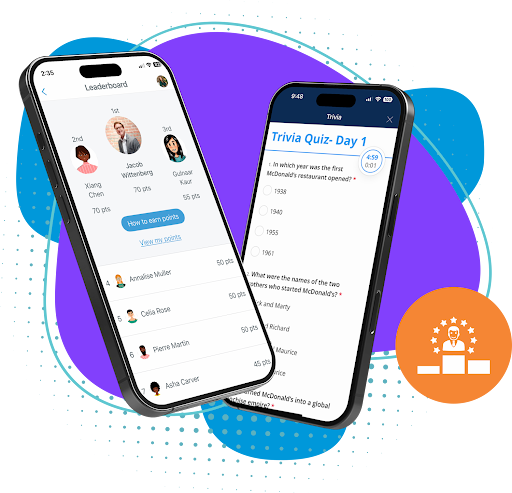
The experiential events page describes themed quiz rounds on attendees' phones with a live leaderboard, and points for visiting booths and attending sessions.
Experiential eventsLive questions and polls
Attendees submit and upvote questions, ask anonymously and answer live polls, with moderation.
Live Q&A and pollsMatched meetings and speed networking
AI-matched one-to-one video meetings online, and speed networking where attendees can meet up to 10 relevant contacts in an hour.
Virtual speed networkingStreaming and onsite check-in
For hybrid events, live streaming of in-person sessions to remote attendees, with onsite check-in and badges for those in the room.
Hybrid event platform
Three example mixes for different goals
These sketches show how the types combine. They are starting points to adapt, not formulas.
A customer conference focused on relationships
One opening keynote, two tracks of short talks, a panel, and a long block of matched meetings and roundtables over lunch. Close with an awards moment for customers. The weight is on conversation, so the talks stay short.
A product launch focused on trying the product
A short reveal in front of everyone, then demo stations or a live demo with questions from the room and the screen, then a hands-on workshop for those who want to go deeper. Ask guests to vote or answer a poll at the reveal so the moment is shared.
A hybrid training day focused on skills
A framing talk, parallel workshops in the room and online, a shared debrief, and a game or quiz at the end to check what people learned. Share the leaderboard across both audiences.
A live experience planning template
Use this template to decide the experiences for an event before you build the agenda. Fill in one block for each experience, then check that the whole set matches your goals.
Live experience planning template
LIVE EXPERIENCE PLAN
Event: [Name]   Date: [Date]   Format: [In person / virtual / hybrid]
Main goal: [What attendees should do or feel]
Second goal: [Optional]
Audience: [Who attends, how many]

EXPERIENCE 1: [Name]
Type: [Keynote / workshop / demo / panel / networking / immersive / entertainment / awards / community moment]
Purpose: [What it is for]
Length: [Minutes]   Capacity: [Number]   Location or room: [Name]
How in-person guests take part: [Description]
How online guests take part: [Description]
Host or facilitator: [Name]   Tech or materials needed: [List]
How we will know it worked: [Measure, for example questions asked, meetings held, feedback score]

EXPERIENCE 2: [Name]
[Repeat the same fields]

EXPERIENCE 3: [Name]
[Repeat the same fields]

CHECKS
Does every goal have at least one experience? [Yes / No]
Is there at least one moment where attendees speak, not only listen? [Yes / No]
Is there a moment both audiences share? [Yes / No]
Is the pace varied across the day? [Yes / No]
Feedback plan: [Survey after each session or at the end]
The Eventdex platform
Tools for live event experiences
- Experiential eventsTrivia, challenges, Q&A and networking tools for interactive events.Learn more about Experiential events
- Event gamificationPoints, challenges and leaderboards for attendees.Learn more about Event gamification
- Live Q&A and pollsUpvoted questions, anonymous posts and live polls.Learn more about Live Q&A and polls
- Speed networkingShort matched meetings for attendees.Learn more about Speed networking
- Hybrid event platformStreaming and onsite tools for mixed audiences.Learn more about Hybrid event platform
“Eventdex helped me run a smooth registration process during my event and helped me deliver an excellent mobile application to my event's attendees. Their support team was brilliant and I really enjoyed incorporating the Eventdex solutions into my events.”
 University at Buffalo
 Eversource Energy
 Georgia Tech
 Influence Communications
FAQ
Live Event Experiences That Drive Engagement: common questions
What is a live event experience?
It is a moment in an event where attendees take part in real time, such as a talk with live questions, a workshop, a demo, a networking round, a game or a ceremony.
How many types of experience should an event have?
Two or three, chosen to match your goals, is enough for most events. Add more only if each has a clear purpose and a place on the agenda.
What drives engagement most?
Moments where attendees do something rather than only listen: ask a question, answer a poll, try a product, meet a person. Which type fits depends on your audience and goal, so test and read the feedback.
Can live experiences work online?
Yes, if you design them for a screen. Talks, panels, polls, matched meetings and games translate well. Immersive physical activations do not, so offer a separate remote version.
How do I know an experience worked?
Set a measure before the event, such as questions asked, meetings held or a rating in a short survey after the session, and compare it with what you wanted.
Build interactive moments into your next event with Eventdex
Start with a free interactive floor plan, or talk to an event specialist on +1 (866) 434-5088.