



Event Games Ideas
Which games work at an event, and how do you run them well?
A good event game gives people a reason to talk to someone new, visit a part of the venue they would have skipped or pay attention to a session they might have drifted through. A bad one makes adults feel like they are at a school assembly. The difference is rarely the game itself. It is whether the game fits the audience, takes little effort to join and has a clear start and end.
This guide lists games and activities for conferences, trade shows, galas and corporate events, with how to run each one, the time and setup it needs and what to avoid. It includes a table to choose between them and a run sheet for a conference game you can copy. For short icebreakers at the start of a meeting, see the team meeting ice breakers guide rather than the list here.
Updated by the Eventdex team



4.7/5 from 39 reviews on each
What makes an event game work
Before choosing a game, decide what it is for. A game that introduces strangers is different from one that sends people to sponsor booths or one that fills a gap between sessions. Pick one purpose per game.
Then check it against four tests. If a game fails any of them, change it or drop it.
Easy to join
People should understand it in one sentence and be able to start in under a minute. Long rules lose the people you most want to include.
Optional
Never force participation. Make sure people who do not want to play can still enjoy the event, and that nothing important is only available to players.
Inclusive
Avoid games that depend on physical ability, alcohol, personal questions or loud performance. Offer a quieter way to take part.
Tied to a goal
A game that sends people to the sponsor area, the networking space or a session has a job. A game with no job is just noise.
Choosing a game: a comparison
Use this table to match a game to your event. Times are rough planning figures for a typical group, not measurements, so test any game before the day.
| Game | Best for | Time to play | Setup | Best event types |
|---|---|---|---|---|
| Trivia | Energy, learning, filling gaps | 10 to 20 minutes per round | Write questions, choose how to score | Conferences, galas, corporate events |
| Bingo (people or session) | Meeting people, paying attention | Runs across the event | A card with squares to fill | Conferences, networking events |
| Scavenger hunt | Exploring the venue and sponsors | 30 to 60 minutes | A list of tasks and a way to verify | Trade shows, large venues, conferences |
| Quiz with a leaderboard | Sustained competition across the event | Runs across the event | An app or tool to score and display | Conferences, trade shows |
| Networking challenge | Introducing people | 10 to 15 minutes | Prompt cards or a list | Conferences, workshops |
| Booth game | Drawing visitors to a booth | Under 5 minutes per visitor | A simple, branded game at the booth | Trade shows |
| Photo challenge | Social energy and memories | Runs across the event | A list of photo prompts | Galas, corporate events, conferences |
| Raffle or prize draw | Keeping people to the end | 5 minutes to draw | Prizes, entry method, draw time | Any event |
Trivia and quizzes
Trivia is the most flexible event game. It works on a stage with a host, at tables during a dinner, or on a phone between sessions. The key is to write questions about your own event, your industry and your speakers, rather than general knowledge, so it feels part of the event.
How to run it
Pick a host, write 8 to 12 questions, mix easy and hard, and give the answer after each question so the room learns something. Keep each round short.
Good question topics
Your industry, your keynote speakers, the host city, your organization's history and sponsor facts. Mix serious and light.
Scoring
Decide in advance: points per correct answer, a bonus for speed, tiebreakers and who judges disputes. Say the rules before the first question.
Using an app
Eventdex has customizable trivia in its event app: you write event-specific questions, such as ones about keynote speakers or sponsors, and decide how often it runs and how hard it is.
Trivia and leaderboards for eventsWhat to avoid
Obscure questions that only a few people can answer, questions that exclude by culture or background, and rounds that run longer than the audience's patience.
Bingo and scavenger hunts
Bingo and scavenger hunts send people around the event with a purpose. They work best when the tasks are things you want people to do anyway.
People bingo
A card of squares such as 'someone who has attended five or more of these events' or 'someone who works in a different country'. People find a different person for each square. Good for networking.
Session bingo
Squares such as 'a speaker mentions a new product' or 'someone asks about budget'. It keeps people listening, but do not make it so loud it disturbs speakers.
Scavenger hunt
A list of tasks: visit a booth, find the registration team, take a photo at a landmark. Tasks should be short and verifiable, with a clear deadline.
Verifying tasks
Use a stamp or sticker at each stop, a code to enter or a photo to show. Whatever you choose, make verification quick, so nobody queues to prove they did it.
Prizes
A prize for completing a card, drawn from everyone who finishes, is fairer than a race. A race favors the fittest and the most competitive.
Leaderboards and point games
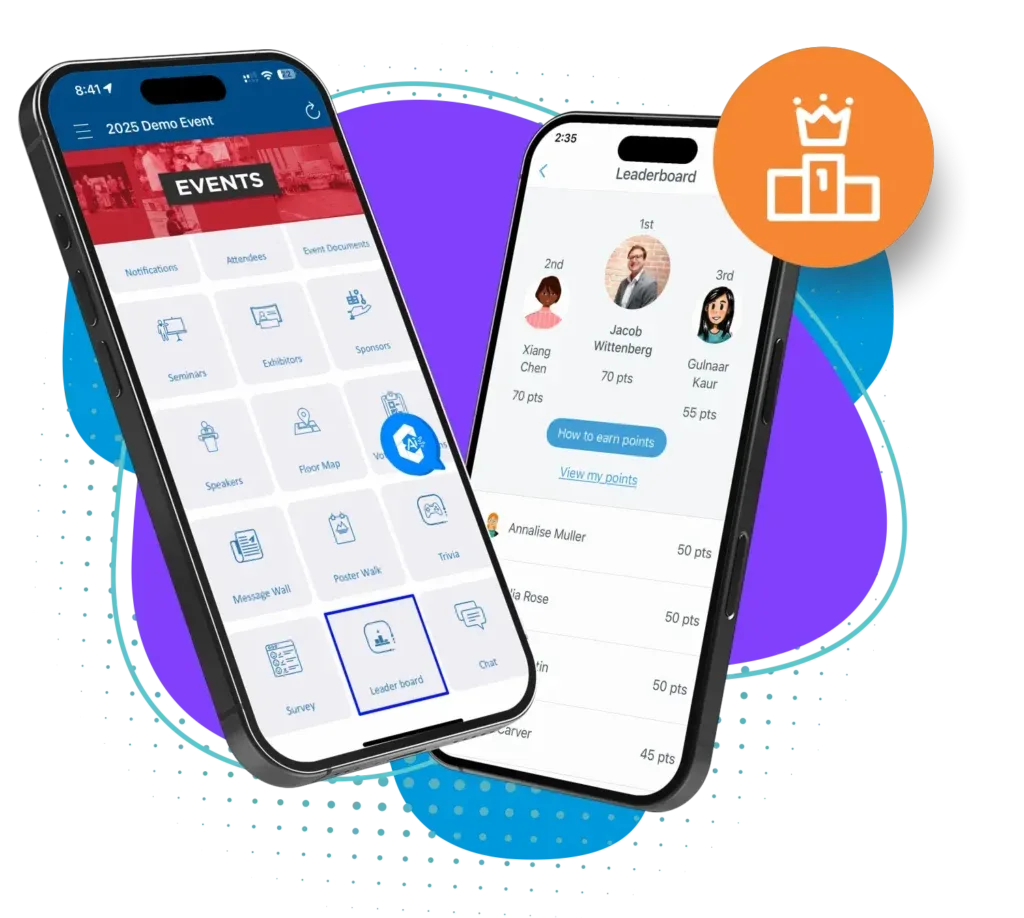
A leaderboard turns many small actions into one running contest. Instead of a single game with a winner at the end, people earn points all event long and watch their ranking move. It suits a conference or trade show where people are spread across rooms and sessions.
Eventdex's trivia and leaderboard feature works this way. You choose which in-app actions earn points, such as adding sessions to a personal schedule, sharing a post on the feed or connecting with other attendees, and whether a point is awarded once or each time the action repeats. The leaderboard updates as soon as trivia points are awarded and can be shown on the event homepage, in session rooms or in the mobile app.
Choose actions that matter
Reward what you want more of: visiting sponsors, attending sessions, meeting people. Do not reward actions that only inflate the score.
Event gamificationCap or limit repeats
Decide whether an action scores once or each time. Allowing unlimited repeats can let one person run away with the board.
Show the board
A visible ranking is what makes it a game. Put it where people will see it, such as a screen or the event app.
Reward more than first place
Eventdex lets you set up digital rewards, exclusive access or giveaways, awarded manually or automatically based on leaderboard rank. Consider prizes for effort, not only for the top score.
Trivia and leaderboards for eventsOnline or onsite
The same mechanics run in virtual and in-person events. For the points scheme itself, see the virtual event gamification guide.
Virtual event gamification guide
Networking and booth games
These two groups of games have different goals. Networking games introduce people to each other. Booth games bring visitors to an exhibitor.
Prompt cards
Give each table or group a card with an open question, such as 'What is the best idea you have heard today?' Better than 'tell us about yourself'.
Connect challenge
Ask each person to meet three people they do not know and learn one thing about each. Reward those who do.
Speed rounds
Short timed conversations, then rotate. For structured versions, see the speed networking guide.
Speed networkingBooth games for exhibitors
A quick skill or knowledge game, a spin of a wheel or a question about the exhibitor's field. The best ones lead to a real conversation. See the trade show booth ideas guide.
Trade show booth ideasSponsor-linked rounds
Eventdex trivia can include sponsor branding in questions and rounds sponsored by exhibitors, which links a game to a sponsor's goals.
What to avoid
Games go wrong in predictable ways. These are the ones that most often turn people off.
Forced participation
Do not call people on stage without asking. Let volunteers come forward.
Embarrassing or personal tasks
Skip anything that exposes someone's body, personal life or finances. Keep it light and about the event.
Games that need alcohol
Drinking games exclude people and create risks for the organizer. Check your venue and insurer for any rules on alcohol and prizes.
Unclear rules and rigged feeling
State the rules, the prize and how the winner is chosen before the game starts. Rules on prize draws vary by place, so check with a lawyer or the local authority before running anything involving a paid entry.
Games that interrupt the program
A game should fill a gap, not eat into a session. Time it for breaks, meals and transitions.
A run sheet for a conference game
This sheet runs a conference-long points game with trivia rounds. Adapt the times and tasks. If you run it in an app, the setup items are done once before the event.
Conference game run sheet
CONFERENCE GAME RUN SHEET

Game name: [for example "The Conference Challenge"]
Purpose: [for example "Get people to sponsor booths and the networking lounge"]
Runs: [day and time start] to [day and time end]
Owner on the day: [name and mobile]

BEFORE THE EVENT
- Choose 4 to 6 actions that earn points (for example: attend a session, visit a sponsor, meet someone new, post a photo)
- Decide points for each action and whether it counts once or each time
- Write 10 to 15 trivia questions about the event, speakers and sponsors, with answers
- Agree prizes and how they are awarded (for example: top scorers, plus a draw among all who took part)
- Write the rules on one page: how to play, how scores are counted, who decides disputes
- Test the setup with two colleagues and fix anything unclear

DAY 1
[Time] Announce the game at the opening session (30 seconds, one slide)
[Time] Game opens: leaderboard visible on the screen in the main area
[Time] Trivia round 1 during the break (10 minutes)
[Time] Post the first leaderboard standings

DAY 2
[Time] Reminder at the opening session, with the current top three
[Time] Trivia round 2 after lunch (10 minutes)
[Time] Sponsor-linked round, if any (10 minutes)
[Time] Game closes

CLOSE
[Time] Announce winners at the closing session
[Time] Hand over prizes or send details
[Time] Thank everyone who took part

AFTER
- Note which actions people did most
- Ask a question about the game in your event survey
- Record what to change next time
The Eventdex platform
Run games inside the event app
- Trivia and leaderboardsCustom trivia, a real-time leaderboard and points for in-app actions.Learn more about Trivia and leaderboards
- Event gamificationGame elements that raise attendee engagement, onsite and online.Learn more about Event gamification
- Event engagement platformPolls, networking and games that keep attendees involved.Learn more about Event engagement platform
- Event sponsorshipBranded games and sponsor placements for in-person, hybrid or virtual events.Learn more about Event sponsorship
“Eventdex helped me run a smooth registration process during my event and helped me deliver an excellent mobile application to my event's attendees. Their support team was brilliant and I really enjoyed incorporating the Eventdex solutions into my events.”
 University at Buffalo
 Eversource Energy
 Georgia Tech
 Influence Communications
FAQ
Event Games Ideas: common questions
What is the best game for a conference?
A points-based game that runs across the event, with a few short trivia rounds, can work well because people can join at any time and play at their own pace. A single big game on stage reaches only people in the room.
How long should an event game last?
A common starting point is 10 to 20 minutes for a live round, a planning figure rather than a rule. Games that run across the whole event, such as bingo or a leaderboard, should need only a minute or two at a time.
Do event games need prizes?
Not always. Recognition on a leaderboard or a shout-out can be enough. If you give prizes, state how winners are chosen in advance and consider drawing among everyone who takes part, not just the top scorer.
How do I include people who do not like games?
Make every game optional, give a quiet way to take part, such as an app instead of a stage, and never tie anything essential to playing.
Does Eventdex run games at events?
Eventdex has trivia and a real-time leaderboard in its event app, with points for in-app actions you choose, sponsor-branded rounds and participation reports. Its pages do not describe physical games such as bingo cards or scavenger hunts; those you run yourself.
Add trivia and a leaderboard to your event
Start with a free interactive floor plan, or talk to an event specialist on +1 (866) 434-5088.